Reports and sharing
How public MiBa Solar dashboard links work
A public dashboard link shows one station's dashboard cards and chart without requiring the viewer to sign in. Anyone with the link can view it until the owner deletes it.
Create a link
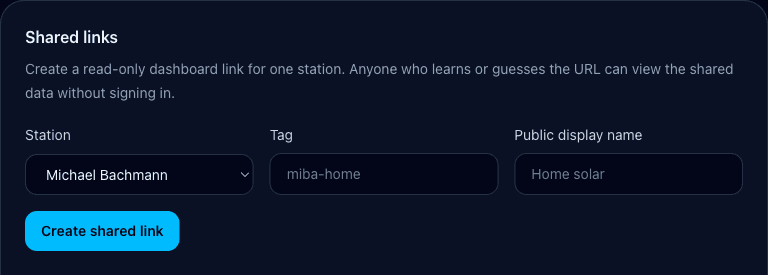
- 1
Open Settings
Find Public dashboard links and choose the station to expose.
- 2
Add a public name and tag
The public name is visible to viewers. The tag becomes part of the URL, so do not put an email, station identifier, address, serial number, or other private detail in it.
- 3
Create and copy
Copy the full origin-derived URL from the active-links list and send it only to intended recipients.
What viewers can and cannot see
All supported cards are always shown. Viewers can adjust chart lines for the current browser session; choices reset after the session and do not affect another viewer.
On Live, rotate a touch-capable phone or tablet to landscape to open the inverter-centered power-flow display. On desktop, use Open live power flow next to Refresh. Opening it from Today or a selected date returns the shared Dashboard to Live first. Exit and theme controls stay local to the viewer and do not update the owner's account.
- Included
- The link's public display name, supported dashboard cards, period controls, source freshness, power chart, Energy reports, and Live power-flow display for one station.
- Not included
- Owner navigation, Settings, exports, devices, credentials, tokens, serial numbers, raw Deye responses, and the owner's other stations.
Stale and unavailable behavior
If Deye authentication expires or is rejected, a public link can show the exact last saved snapshot marked stale. If no matching snapshot exists, it shows a generic unavailable state. The public route never asks the viewer for the owner's Deye credentials.
Revoke a link
- 1
Return to Settings
Find the exact active link by its public name and URL.
- 2
Delete it
Deletion is immediate and permanent. The tag becomes reusable, but old recipients no longer receive dashboard data from the deleted link.
- 3
Create a replacement when needed
Use a new tag and share only the new URL. Do not rely on an unguessable tag as a substitute for deciding who should receive it.
Treat the URL as access
The link has no viewer login. Anyone who receives or guesses an active tag can view its public dashboard data until the owner deletes it.